
Certification, security and privacy
This page is for administrators and security reviewers. It sets out what Icon Map Lite is allowed to do, what it does with your data and uploaded files, and how it relates to Microsoft's certification of Power BI visuals.
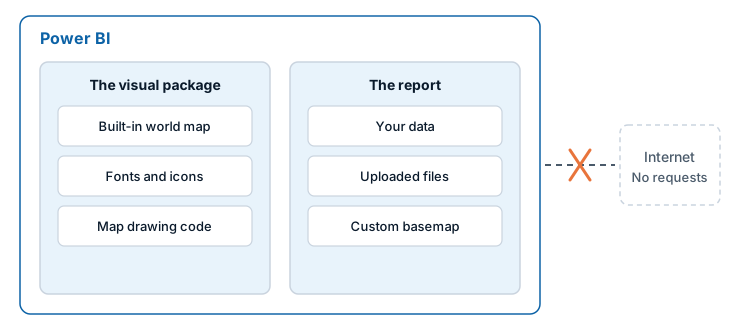
Summary
- Icon Map Lite runs inside Power BI's custom visual sandbox, in the browser or in Power BI Desktop.
- It makes no network requests of any kind and declares no privileges: no web access, no local storage and no sign-in.
- The world map it draws, its fonts and every icon are inside the visual package.
- Files you upload are stored in the report. They are not sent to any service.
- It sends no telemetry, and the license check is done by Power BI.
Certification by Microsoft
Microsoft certifies Power BI visuals that meet its requirements, after reviewing their code. One of the requirements is that a visual does not access external services:
Accessing external services or resources. For example, no HTTP/S or WebSocket requests can go out of Power BI to any services.
The full criteria are in the Microsoft documentation on certified visuals.
Icon Map Lite is built to meet these requirements. Map visuals usually load their background maps from a tile service, which a certified visual cannot do, so Icon Map Lite carries its own world map inside the visual instead, and takes street-level detail as a file you upload.
Certification is granted by Microsoft. The Icon Map Lite listing on Microsoft AppSource shows whether the visual is certified.
Tenants that allow certified visuals only
Power BI has a tenant setting, Add and use certified visuals only (block uncertified). Where it is on, Power BI allows a visual once Microsoft has certified it, and replaces other visuals with a message about your admin settings. A Power BI administrator can also allow a specific visual by adding it as an organizational visual.
What the visual is allowed to do
Power BI grants a custom visual only the privileges it declares. Icon Map Lite declares none.
| Privilege | Icon Map Lite |
|---|---|
| Web access | Not declared. The visual cannot make network requests |
| Local storage | Not declared |
| Microsoft Entra sign-in | Not declared |
The libraries the visual uses are packaged inside it. The code that could make a network request is removed from them when the visual is built, and images held in your data as data: URIs are decoded inside the visual.
The only way Icon Map Lite leads outside Power BI is a link that a person selects, such as Documentation on the start page or Buy a license on the license page. Power BI opens the link, and asks the person to confirm first.
Your report data
- Icon Map Lite draws your rows itself, inside the visual. Nothing is sent anywhere to draw them. There is no geocoding: you supply coordinates, shapes, or values that match shapes.
- Tooltips, selection and filtering go through Power BI's own interfaces.
- Images and shapes held in your data are read from your data. Links to images on the web are not followed.
Uploaded files and custom basemaps
Files you upload are stored inside the report definition:
- Boundary and shape files: GeoJSON, TopoJSON, KML, zipped shapefiles, IMDF and PMTiles archives.
- Custom basemaps:
.imbasefiles of up to 25 MB.
They are not uploaded to any service. Anyone who can open the report can read them, so treat an uploaded file as being as sensitive as the report itself, and check that its license allows it to be shared with the report's viewers.
A custom basemap is checked before it is accepted. Every address that a style in the file refers to must point inside the file, and a file whose style points anywhere else is refused, not trimmed. An accepted basemap cannot reach the network. See Custom basemaps (.imbase).
License checks
Icon Map Lite is licensed per user through Microsoft AppSource. The visual asks Power BI which plans the signed-in user has, and Power BI answers. Nothing is sent to Icon Map or any other service for this. There are no license keys. See How Icon Map Lite is licensed.
Telemetry
None. Icon Map Lite does not report usage, errors or anything else.
The built-in world map
The world map inside the visual is built from Natural Earth data, which is in the public domain. Its labels use the Noto Sans font, which is published under the SIL Open Font License.
Reporting a security issue
Contact support@icon-map.com, or use the support page.