
Release notes
What changed in each version of Icon Map Lite, newest first. Use this page to check whether a fix or feature is in the version you are running.
Which version am I running?
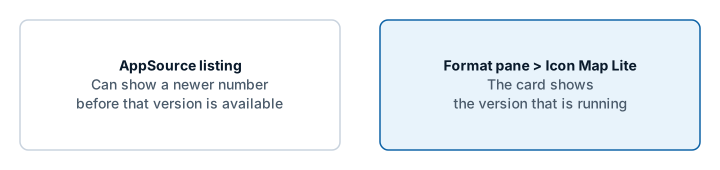
Select the visual and open Format pane > Icon Map Lite, the last card in the pane. It shows the version that is running. The start page of an empty visual shows it too.
Power BI loads the newest version that Microsoft AppSource has published, so a report picks up a new version without any action from you. When a new version is submitted, AppSource can list its number before the visual itself is available, so the number on AppSource may not match the one you are running. The number in the Icon Map Lite card is the one to trust.
1.0.1.1
Built-in world map
- The built-in world map now covers zoom levels 0 to 3, from world to country scale, and is built from Natural Earth data only. Version 1.0.1.0 covered zoom levels 0 to 5, which made the visual too large to import into the Power BI service from a file. Beyond zoom 3 the map adds no detail. For street-level detail, upload a custom basemap. See The background map.
- City names still follow the report's language.
- A new logo, and an AppSource button of its own on the license page.
Layers
- Routes: a new line shape that draws lines sharing a street side by side, like a transit map. See Routes.
- Cells can count points inside shapes you upload. See Cells: H3 hexagons and grids.
- Data labels on shapes from PMTiles archives.
- Blank text cells now count as empty when a row picks its layer, so tables from CSV files, Excel and Power Query can feed several layers without extra measures. See Combine several layers in one map.
Labels
- Card labels: a choice of where the text sits around the image, a solid fill instead of the frosted background, vertical alignment, and labels that appear only on mouse over or when selected. See Data labels.
- The callout tail follows the label's Position.
- Flow Tree labels at the midpoint sit on their own branch, clear of each other.
Fixes
- Flow arcs and Flow Tree with circles on no longer move the map on every formatting change.
- 3D Arcs: the tooltip stays up along an arc, and clicking an arc no longer counts as a click on the background.
- The visual loads for users whose browser sessions pass through Microsoft Defender for Cloud Apps.
1.0.1.0
The first version of Icon Map Lite: a version of Icon Map built to meet Microsoft's certification requirements.
No network requests
- The visual declares no privileges and makes no network requests. Everything it draws is inside the visual or stored in the report.
Background map
- A world map built into the visual, in six themes and a High contrast theme, or None for a transparent background.
- Place names follow the report's language.
- Switches for the map's labels, boundaries, and land and water features.
- With Windows high contrast on, the map and its controls follow the viewer's high contrast colors.
- Custom basemaps: upload an
.imbasefile for street-level detail of one area. It is stored in the report. The start page, the layer guide and the upload window link to the Basemap Builder. See Custom basemaps (.imbase).
Layers and files
- Upload GeoJSON, TopoJSON, KML, zipped shapefiles, IMDF and PMTiles archives as Shapes (from files) layers and as reference layers.
- Built-in boundaries for Shapes (from files): countries, countries split into their parts, and states and provinces. Each drill-down level can use its own source.
- Lines: the 3D Arcs, Flow arcs and Flow Tree shapes.
- Card data labels: Glass, Dark Glass, Card, Pill, Neon and Halo Text.
- Clusters with colors from a field or a rule, and every cluster category in the legend.
- Text and emoji badges for the Images layer.
- EPSG reprojection on every data layer that has the EPSG setting.
Selection and accessibility
- Selecting on the map filters the report like a slicer, and bookmarks keep the selection.
- Lasso and circle select reach shapes from PMTiles archives.
- Keyboard navigation of the items on the map.
- Clicking a tile in the "What kind of map are you making?" guide turns that layer on.
Licensing
- Licensed per user through Microsoft AppSource. Viewers without a license see a license page, and environments that cannot report licenses show a page that explains Icon Map Lite is not supported there.